Greasy Fork

Greasy Fork is available in English.

自动聚焦第一个输入框,可自定义快捷键

进页面聚焦到第一个搜索框中,默认使用ctrl+q可手动触发,可自定义快捷键

当前为 2022-05-04 提交的版本,查看 最新版本

您需要先安装一个扩展,例如 篡改猴Greasemonkey暴力猴,之后才能安装此脚本。

You will need to install an extension such as Tampermonkey to install this script.

您需要先安装一个扩展,例如 篡改猴暴力猴,之后才能安装此脚本。

您需要先安装一个扩展,例如 篡改猴Userscripts ,之后才能安装此脚本。

您需要先安装一款用户脚本管理器扩展,例如 Tampermonkey,才能安装此脚本。

您需要先安装用户脚本管理器扩展后才能安装此脚本。

(我已经安装了用户脚本管理器,让我安装!)

您需要先安装一款用户样式管理器扩展,比如 Stylus,才能安装此样式。

您需要先安装一款用户样式管理器扩展,比如 Stylus,才能安装此样式。

您需要先安装一款用户样式管理器扩展,比如 Stylus,才能安装此样式。

您需要先安装一款用户样式管理器扩展后才能安装此样式。

您需要先安装一款用户样式管理器扩展后才能安装此样式。

您需要先安装一款用户样式管理器扩展后才能安装此样式。

(我已经安装了用户样式管理器,让我安装!)

作者
Vinsea
评分
0 0 0
版本
1.0.0
创建于
2022-05-01
更新于
2022-05-04
大小
19.3 KB
许可证
MIT
适用于
所有网站

@vinsea/tampermonkey-autofocus

说明 what can I do

自动聚焦第一个input框,默认可以使用 ctrl + q 触发自动聚焦,快捷键可修改

automaticly focus on first input box, manually trigger with shortcut keys ctrl q (can be modified on the settings)

安装 install

安装脚本|install

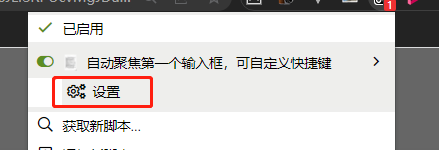
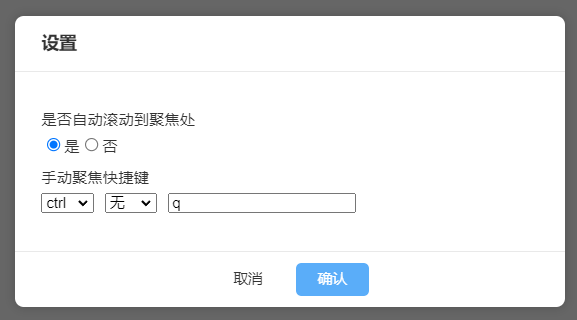
设置 settings

  1. 默认会自动滚动到聚焦处
  2. the browser will scroll the element into view after focusing it,if this is set to false/, no scrolling will occur. 1

  3. 设置快捷键

  4. Set shortcut keys 2

其他 others

更新日志|changelog