Greasy Fork

Greasy Fork is available in English.

AO3: Site Wizard

Change fonts and font sizes across the site easily and fix paragraph spacing issues.

当前为 2025-10-02 提交的版本,查看 最新版本

您需要先安装一款用户脚本管理器扩展,例如 Tampermonkey 篡改猴Greasemonkey 油猴子Violentmonkey 暴力猴,才能安装此脚本。

您需要先安装一款用户脚本管理器扩展,例如 Tampermonkey 篡改猴,才能安装此脚本。

您需要先安装一款用户脚本管理器扩展,例如 Tampermonkey 篡改猴Violentmonkey 暴力猴,才能安装此脚本。

您需要先安装一款用户脚本管理器扩展,例如 Tampermonkey 篡改猴Userscripts ,才能安装此脚本。

您需要先安装一款用户脚本管理器扩展,例如 Tampermonkey 篡改猴,才能安装此脚本。

您需要先安装一款用户脚本管理器扩展后才能安装此脚本。

(我已经安装了用户脚本管理器,让我安装!)

您需要先安装一款用户样式管理器扩展,比如 Stylus,才能安装此样式。

您需要先安装一款用户样式管理器扩展,比如 Stylus,才能安装此样式。

您需要先安装一款用户样式管理器扩展,比如 Stylus,才能安装此样式。

您需要先安装一款用户样式管理器扩展后才能安装此样式。

您需要先安装一款用户样式管理器扩展后才能安装此样式。

您需要先安装一款用户样式管理器扩展后才能安装此样式。

(我已经安装了用户样式管理器,让我安装!)

作者
BlackBatCat
评分
0 0 0
版本
2
创建于
2025-09-24
更新于
2025-10-02
大小
31.6 KB
许可证
MIT
适用于

AO3: Site Wizard

Transform your AO3 reading experience with complete font and layout control:

  • 🎨 Site-Wide Font Customization — Change fonts, sizes, and weights across the entire site.
  • 📖 Work-Specific Formatting — Customize how stories appear with width, alignment, and spacing controls.
  • 🎯 Element-Specific Fonts — Set different fonts for headers, code blocks, and other elements.
  • ✨ Automatic Spacing Fix — Eliminates excessive paragraph spacing in poorly formatted works.

✨ Features

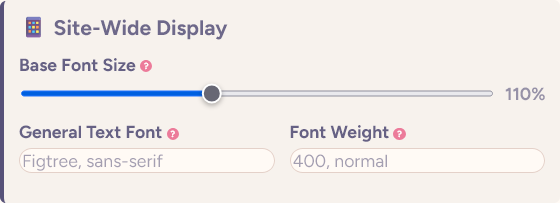
Site-Wide Formatting

Alt text

  • Base Font Size: Adjust the overall text size for the entire site (50-200% of browser default).
  • General Text Font: Set a custom font family for most site text.
  • Font Weight: Control the boldness of general text across AO3.

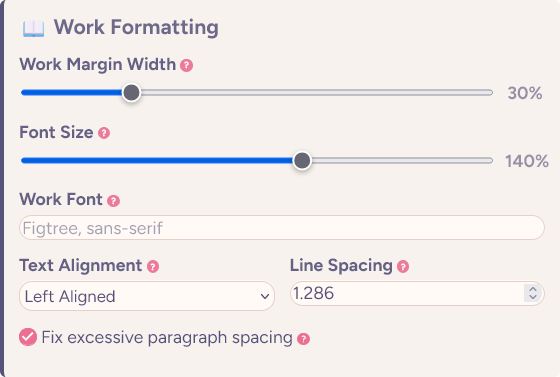
Work Formatting

Alt text

  • Work Margin Width: Control how wide the work reader appears (10-100% of viewport).
  • Font Size: Scale work text relative to your site base size (50-200%).
  • Text Alignment: Choose between left-aligned, justified, or right-aligned text.
  • Line Spacing: Fine-tune vertical space between paragraphs with decimal precision.
  • Work Font: Set a specific font family just for reading stories.
  • Spacing Fix: Automatically removes unnecessary blank lines and excessive spacing.

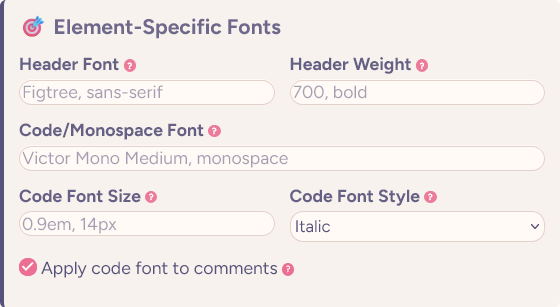
Element-Specific Formatting

Alt text

  • Header Font: Customize fonts for all headings (H1-H6).
  • Header Weight: Control header text boldness separately from body text.
  • Code/Monospace Font: Set fonts for code blocks and preformatted text.
  • Code Font Style: Choose normal or italic styling for code elements.
  • Code Font Size: Scale code text relative to surrounding content.

⚙️ How to Use

  1. Install with a userscript manager:
  2. Click "Userscripts" in the header menu, then "Site Wizard Settings" to customize.
  3. Adjust fonts, sizes, alignment, and spacing to your preference.
  4. Click "Apply Settings" to save — changes persist across browser sessions.

🎨 Customization Tips

Font Recommendations

Check out my other scripts: