Claude Token Saver - Tampermonkey Userscript
📋 Overview
Claude Token Saver is a Tampermonkey userscript designed to optimize your Claude.ai workflow by preventing token waste and timeout errors. It enforces file creation instead of chat pasting for large outputs, ensuring efficient token usage and preventing session timeouts.
✨ Key Features
| Feature |
Description |
| Real-time Response Monitoring |
Warns at 500 characters, alerts at 1000+ characters to prevent excessive chat pasting |
| Automatic Paste Pattern Detection |
Identifies Markdown, code blocks, and other paste patterns that should be files instead |
| File Creation Enforcement |
Forces Claude to save outputs as downloadable files rather than pasting into chat |
| Draggable Floating Panel |
Minimize/maximize control panel for easy workspace management |
| Uploaded File Detection |
Automatically detects uploaded files and generates appropriate copy-paste commands |
| One-Click Command Copying |
Quick copy functionality for file creation commands to streamline workflow |
| Visual Status Indicator |
Draggable status display with color-coded alerts for response monitoring |
| Automatic Prompt Injection |
Reminder system to ensure proper prompting for file creation |
| Timeout Prevention |
Prevents session timeouts caused by excessively long chat responses |
🎯 Perfect Use Cases
- Document Processing - Converting notes, formatting content, generating reports
- Code Generation - Creating complete scripts, applications, or configurations
- Data Conversion - Transforming datasets, tables, or structured information
- Content Creation - Writing articles, guides, documentation, or creative content
- Large Output Tasks - Any workflow where Claude might generate 1000+ character responses
🚀 How It Works
Response Monitoring System
Warning Threshold (500 characters):
- 🟡 Yellow alert appears
- Gentle reminder to consider file creation
- Allows flexibility for medium-length responses
Alert Threshold (1000+ characters):
- 🔴 Red alert triggers
- Strong recommendation to create file instead
- Prevents token waste and timeout risks
Automatic Pattern Detection
The script recognizes common paste patterns:
- Markdown tables and formatted text
- Code blocks (JavaScript, Python, HTML, CSS, etc.)
- Multi-section documents
- Structured data outputs
- Long-form content
File Creation Workflow
- Detection: Script identifies large output or paste pattern
- Alert: Visual indicator warns about token usage
- Command Generation: Provides ready-to-copy file creation command
- One-Click Copy: Single click copies command to clipboard
- Enforcement: Reminds Claude to create downloadable file
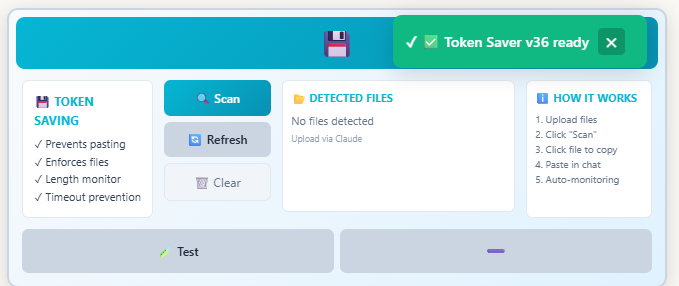
📸 Interface Preview
The screenshot shows the draggable floating panel with:
- Real-time character count monitoring
- Alert status indicators (green/yellow/red)
- File command copy buttons
- Minimize/maximize controls
- Clean, non-intrusive design
💡 Benefits
| Benefit |
Impact |
| Token Savings |
Prevents waste from repeated large chat pastes |
| No Timeouts |
Avoids session timeouts from processing long outputs |
| Cleaner Workflow |
Files are easier to download, save, and reuse |
| Better Organization |
Downloadable files vs. scattered chat messages |
| Faster Processing |
File creation is more efficient than chat rendering |
| Improved UX |
Visual alerts and one-click commands streamline work |
🔧 Installation
- Install Tampermonkey browser extension
- Add Claude Token Saver userscript
- Visit Claude.ai - script activates automatically
- Look for floating status indicator
- Start working - automatic monitoring begins
📝 Usage Tips
For Best Results:
- Use file creation commands for outputs over 1000 characters
- Pay attention to yellow warnings (500+ chars) - consider switching to file
- Click command copy buttons for instant file creation prompts
- Keep the floating panel visible to monitor response length
- Upload files knowing the script will generate proper commands
Recommended Commands:
- "Create a file with [description]"
- "Generate a downloadable document of [content]"
- "Make a file containing [output]"
- "Save this as a downloadable file"
⚙️ Customization
The script includes:
- Adjustable character thresholds
- Customizable alert colors and positions
- Panel drag-and-drop positioning
- Minimize/maximize preferences
- Command template modifications
🎓 Why This Matters
Token Economy:
Long chat outputs consume significant tokens and can cause:
- Conversation context limits reached faster
- Increased latency and slower responses
- Higher risk of timeout errors
- Inefficient token usage patterns
File Creation Advantage:
Files are processed once and downloaded, providing:
- Single token expenditure for generation
- No repeated rendering costs
- Permanent downloadable output
- Better for large content workflows
🌟 Ideal For
- Power users processing multiple documents daily
- Developers generating code files and configurations
- Content creators working with long-form outputs
- Data analysts converting and formatting datasets
- Anyone experiencing timeout issues with Claude
- Users wanting to optimize their token usage
Claude Token Saver transforms how you work with Claude.ai by making file creation the default for large outputs, saving tokens, preventing timeouts, and streamlining your workflow with intelligent monitoring and one-click commands.
📸 Screenshot