✨ Preview and Read Comments for YouTube Links on Any Site


 📍 Author: GitHub | Script: Repository
Adds inline playback and a paginated comment browser to any YouTube link detected on any website.
Hide image
🌐 Overview
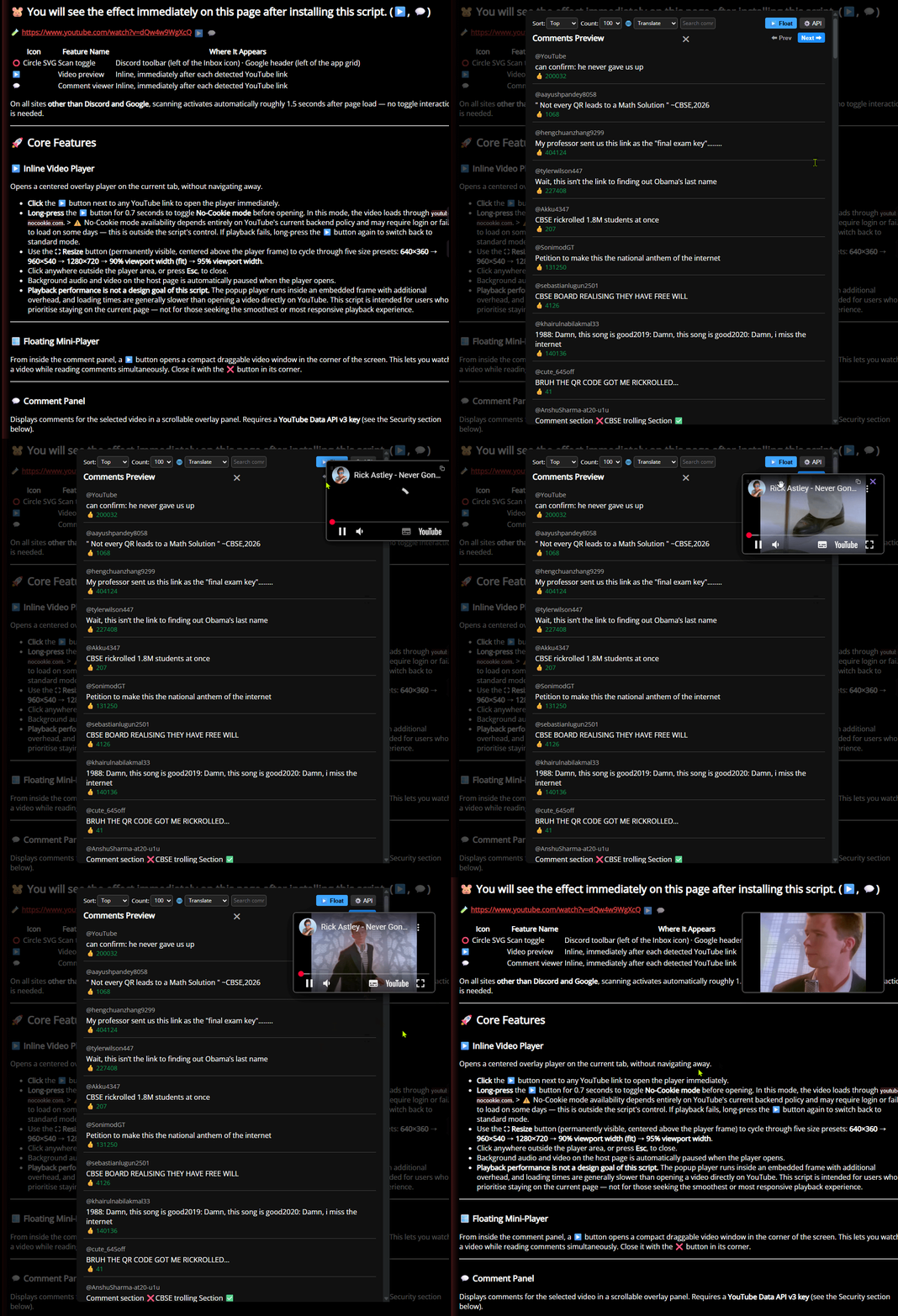
When a YouTube video link is found on a page, two small buttons are injected next to it: one opens an overlay player directly on the current tab, and the other opens a comment panel with sorting, keyword search, and translation options. On sites like Discord and Google Search, a toolbar toggle controls when scanning is active. On all other sites, scanning runs automatically on page load.
🎛 Getting Started
After installation, the buttons appear automatically next to any YouTube video link on any page (excluding YouTube itself).
🐹 You will see the effect immediately on this page after installing this script. (▶️, 💬)
🧪 https://www.youtube.com/watch?v=dQw4w9WgXcQ
| Icon |
Feature Name |
Where It Appears |
| ⭕ Circle SVG |
Scan toggle |
Discord toolbar (left of the Inbox icon) · Google header (left of the app grid) |
| ▶️ |
Video preview |
Inline, immediately after each detected YouTube link |
| 💬 |
Comment viewer |
Inline, immediately after each detected YouTube link |
On all sites other than Discord and Google, scanning activates automatically roughly 1.5 seconds after page load — no toggle interaction is needed.
🚀 Core Features
▶️ Inline Video Player
Opens a centered overlay player on the current tab, without navigating away.
- Click the ▶️ button next to any YouTube link to open the player immediately.
- Long-press the ▶️ button for 0.7 seconds to toggle No-Cookie mode before opening. In this mode, the video loads through
youtube-nocookie.com.
> ⚠️ No-Cookie mode availability depends entirely on YouTube's current backend policy and may require login or fail to load on some days — this is outside the script's control. If playback fails, long-press the ▶️ button again to switch back to standard mode.
- Use the ⛶ Resize button (permanently visible, centered above the player frame) to cycle through five size presets: 640×360 → 960×540 → 1280×720 → 90% viewport width (fit) → 95% viewport width.
- Click anywhere outside the player area, or press Esc, to close.
- Background audio and video on the host page is automatically paused when the player opens.
- Playback performance is not a design goal of this script. The popup player runs inside an embedded frame with additional overhead, and loading times are generally slower than opening a video directly on YouTube. This script is intended for users who prioritise staying on the current page — not for those seeking the smoothest or most responsive playback experience.
🪟 Floating Mini-Player
From inside the comment panel, a ▶️ button opens a compact draggable video window in the corner of the screen. This lets you watch a video while reading comments simultaneously. Close it with the ❌ button in its corner.
💬 Comment Panel
Displays comments for the selected video in a scrollable overlay panel. Requires a YouTube Data API v3 key (see the Security section below).
- Click the 💬 button next to any YouTube link to open the panel.
- Sort comments by Top (relevance) or Newest using the sort selector.
- Set a comment count limit: 100, 300, 500, or 800 comments per session.
- Search comments by keyword using the search input — filters the currently loaded set in real time.
- Translate all visible comments into a selected language (50+ options grouped by region) using the language selector. Translation is provided by a free public endpoint and may be inconsistent for long or complex text.
- Paginate through result sets using the Prev / Next buttons when more comments are available.
- Open a floating mini-player (▶️ button) for the same video directly from the comment panel.
- The API key can be added, replaced, or deleted directly from the panel's ⚙️ API button without opening the script menu.
⭕ Scan Toggle (Discord & Google)
A toggle button injected into the site's own toolbar. Controls whether YouTube link scanning is active.
🖥️ Why does this toggle exist? On most modern hardware, the background scanning is lightweight enough that you'll never notice it running. However, users on older or lower-spec PCs may prefer to keep scanning off by default and only activate it on demand — which is exactly what this button is designed for. If your machine handles it fine, feel free to leave it in Always-On mode and forget about it.
- Click to activate scanning for 10 seconds. A circular countdown badge is displayed at the top-right of the button during this window, with the arc turning orange in the final 3 seconds. Once the countdown ends, scanning shuts off automatically.
- Click again while active (10s countdown mode only) to cancel immediately.
- Hold for 0.5 seconds to open the Mode Menu — a floating popup with contextual options based on the current state:
| State |
Available Options |
| Off |
⏱ 10s Scan · 🔒 Always-On · ⏰ Close After 1 Hour |
| Counting Down |
🔒 Lock Always-On · ⏰ Close After 1 Hour · ⏹ Close Now |
| Always-On |
⏱ 10s Scan (unavailable) · ⏰ Close After 1 Hour · 🔓 Disable Always-On · ⏹ Stop Scanning |
| Sleeping 💤 |
💤 Status info · ☀️ Wake Up · ⏹ Stop Scanning |
Mode details:
- Always-On — Yellow glow on the icon. Scanning stays active indefinitely. Single-click is blocked in this state; use the Mode Menu to change modes.
- Close After 1 Hour — Starts Always-On scanning and automatically shuts everything off after 1 hour. Useful for semi-AFK sessions.
- Auto-Sleep — After several hours of continuous Always-On scanning, the button enters sleep mode (orange glow + ZzZ animation). The observer is paused to reduce resource usage, but the Always-On setting is preserved. Open the Mode Menu and select Wake Up to resume. Sleep duration can be configured via the script menu → Set Auto-Sleep Duration.
The toggle persists its state across page reloads via script storage.
💬 Want this toggle on another site? Only Discord and Google Search are currently supported. If you'd like to see it added elsewhere, please leave feedback via the script's Greasy Fork page or GitHub — site-specific injection requires targeted selectors and testing.
🧪 Experimental Features & Known Limitations
- Comment translation: Uses an unauthenticated public translation endpoint. Request volume, language detection accuracy, and availability are not guaranteed.
- Google Search injection: Targets title-linked results only. URL breadcrumb rows and thumbnail-only links are excluded to avoid visual conflicts.
- Discord and Google: Are the only sites with a manual toggle. All other sites receive automatic injection with no on/off control beyond uninstalling or disabling the script.
- Auto-crash recovery monitor: Monitors inline iframes and restarts the player if the embedded frame becomes unresponsive. This is a best-effort mechanism and may not catch all failure cases.
- YouTube channel, playlist, or user page links: These are intentionally excluded — only direct video links generate buttons.
Additional Tip
- YouTube Player Updates: YouTube may update its player elements, which could occasionally cause the plugin to become unstable or fail to function properly.
⚙️ Additional Features
Access all configuration options through the script menu (click the Tampermonkey extension icon while on any supported page):
- Manual Refresh — Forces a rescan of all YouTube links currently visible on the page.
- Add / Edit API Key — Opens a prompt to enter a YouTube Data API v3 key. The key is validated against a live test request before being saved. Required to use the comment viewer.
- Delete API Key — Removes the stored key and disables comment fetching.
- Set Button Size — Adjusts the font size of the ▶️ and 💬 inline buttons (in pixels). Takes effect on the next page load.
- Toggle Debug Mode — Enables verbose console logging. Intended for troubleshooting. Takes effect on the next page load.
- Toggle Always-On Mode — A quick shortcut to switch between Always-On and 10-second auto-close modes.
- Set Auto-Sleep Duration — Set how many hours Always-On mode should run before automatically pausing. The minimum is 0.5 hours; the default is 3 hours.
- 🌐 Language Settings — Opens a language picker overlay to switch the script's interface language. Available options: English, Traditional Chinese, Simplified Chinese, Japanese, Korean. The page reloads automatically after selection to apply the change.
🔐 Security & Privacy Notice
⚠️ This script includes a feature that requires you to supply and store a YouTube Data API v3 key.
| Data Type |
Purpose |
Storage |
Transmitted To |
| YouTube Data API v3 Key |
Authenticates comment fetch requests |
Local script storage only |
googleapis.com (YouTube API endpoint) |
This script does not collect, share, or transmit your API key to any server other than Google's YouTube Data API.
💡 The API key is strictly opt-in — no key means no risk.
The key is only used when you explicitly open the comment panel (💬). All other features — the inline player, scan toggle, No-Cookie mode, floating mini-player, and language settings — operate entirely without it and are completely unaffected.
If you choose to add a key, you can review the full source code on Greasy Fork before doing so. The key is never sent anywhere except to Google's own API endpoint during comment fetches initiated by you.
🗂️ Unlike most Google Cloud APIs, the YouTube Data API v3 is available under a free daily quota with no billing account or credit card required. A standard Google account is sufficient to create a project and generate an API key via Google Cloud Console. For casual personal use, the free quota is unlikely to be exhausted.
- This userscript is primarily maintained on Greasy Fork.
- Built with AI assistance by a hobbyist developer.
Bug fixes and updates may not be immediate.
- Feedback is welcome. Responses may be assisted by translation tools if needed.

